How to use the python function to repeat the task?

Image credit: towarddatascience

Doing the same task is boring. Also, the same thing in python is boring. So what’s the solution?

The conventional solution could be to do the program again and again but it becomes frustrating.

So, you can use the python function. You will tell me what’s the python function?

How can I automate the repeated task?

I’m going to show you what’s the python function? How can you use it? And what’s the benefit of using it?


What’s the python function?

The python function is a process where you can do repeated tasks easily. For example, passing numbers through function.

Whenever you want to repeat a task you can just call the function.

So, your next question how it looks like?

The appearance of the python function shows

def function_name(args):

In the above syntax you can see that I have started the function with def keyword.

The meaning of the def keyword is to define the function name.

After the def keyword, you can see that I have passed the arguments with parenthesis and at last semicolon(:).

Remember, it’s the starting point of function, not the whole structure of the function.

When you move forward in the blog you understand the structure of the python function.


Use of docstring

You will be amazed,” I have known about string”. But What’s the docstring?

Don’t be amazed it’s the element of the python function which explains what are you doing in function?

It looks like:-

def function_name(args):
""" what the
function doing"""

You can say, docstring in function is similar to comment in python.

Remember, docstring use triple quotes for comment.

Till this point I have define function name, argument and docstring.

The next point I’m going to show you is the statement or output which going to display on the computer screen.


Return statement in function

The return statement returns the statement after calling the function.

It ends the execution If the function calls and returns the result.

For example,
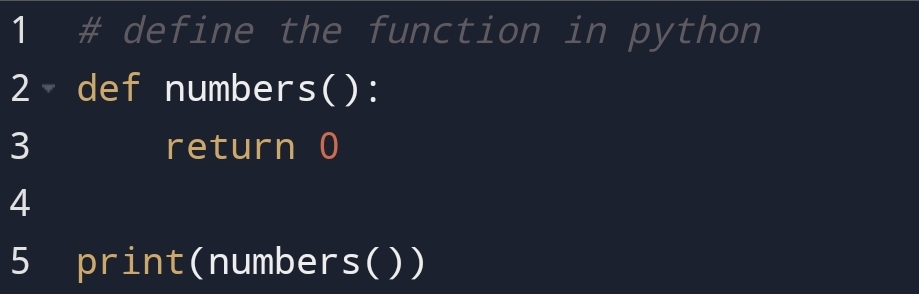
Output:

If the return statement is without any expression then the special value none is returned.

For example,

Output:

You can see that If there is no expression in the return statement result will be None.

So, you would say why the None value?

None value means no expression in the return statement.


Passing the value

You can pass the value from a function to display the output with the passed value.

For example,
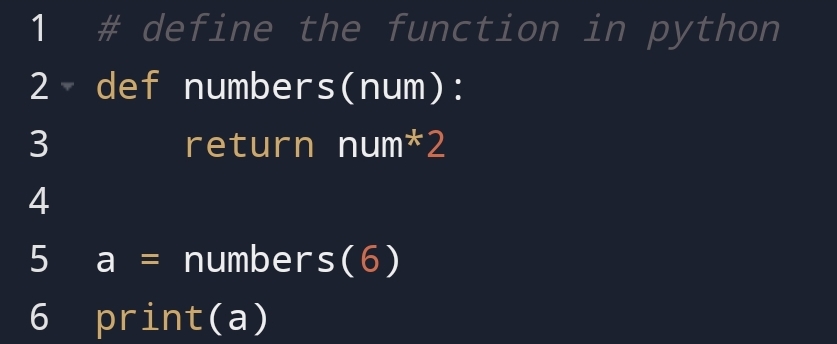
Output:

In here, you can see that I have passed the number 6 and the result has come.

You can also pass the value without a return statement. But output will display with a statement.

For example,
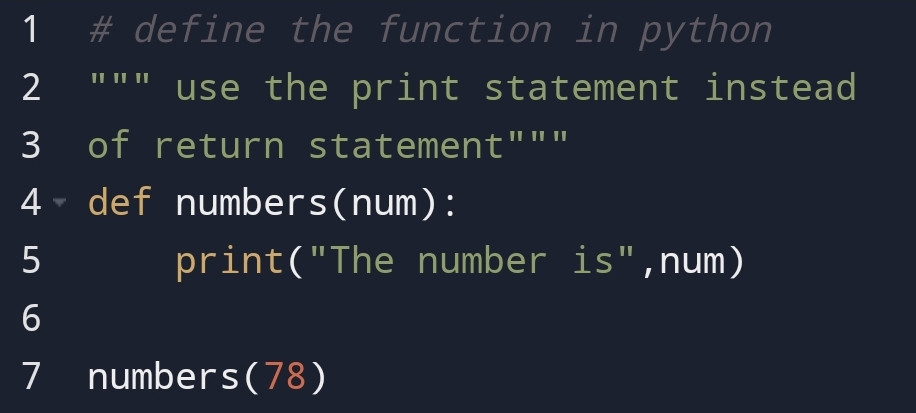
Output:

In the above example, you can see that output has come with a statement.

Arbitrary and keyword argument

In the next part of the blog, you are going to see what’s the arbitrary and keyword argument.

So, let’s see how can you passed the value in different way.


When number of arguments are not fixed!

Suppose, In a function, you don’t know how many values or arguments are going to pass. You can use arbitrary keyword.

You will be amazed what’s the arbitrary keyword?

You are going to see what’s it?

The arbitrary keyword is an asterisk(*) sign with arguments that permit you to pass as many arguments as you want to pass.

You can relate to this example.

For example,

Output:

In the above example, you can see that I have displayed the two numbers in a different statement.

Remember, the arbitrary argument is accessed using indexing.


Pass the argument as key-value pair!- Keyword argument

You can use a keyword argument to pass the key-value pair from the function.

For example,
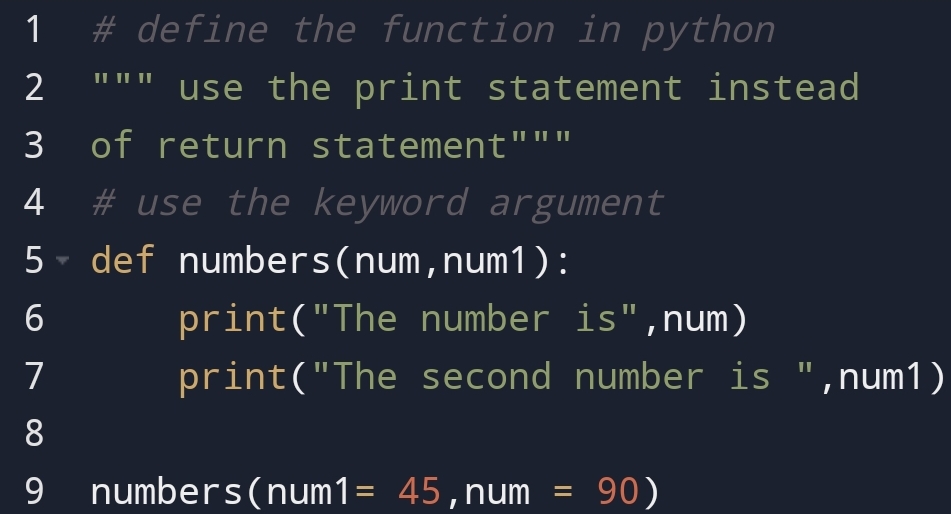
Output:

So, you would say what’s the benefit of keyword argument.

If you clearly see that I have given first position to num1 even in function num position is first.

What’s that mean?

That means you don’t care about the order of the argument. You can put in any order with the help of the keyword argument.

In the above example, you had seen how can you pass arguments in any order.


You don’t know how many keyword arguments- **Arbitrary keyword argument

You can see what I’m going to do in this section with the heading.

I’m going to show you what’s the benefit of an arbitrary keyword argument!

You can pass as many as keyword argument using **Arbitrary keyword argument.

You can use a double-asterisk(**) sign to indicate this.

For example,

Output:

In the above example, you can see that I have passed multiple keyword arguments using ** double-asterisk.

How can you display value of the key?

You can display the value of the key using the key in the print statement.


Pass statement in python- make an empty function!

You can use the pass statement in the python function if you don’t want to execute the function.

Perhaps, you would say, ” We will not give print or return statements”.

You thought right but It will give an error.

For example,

Output
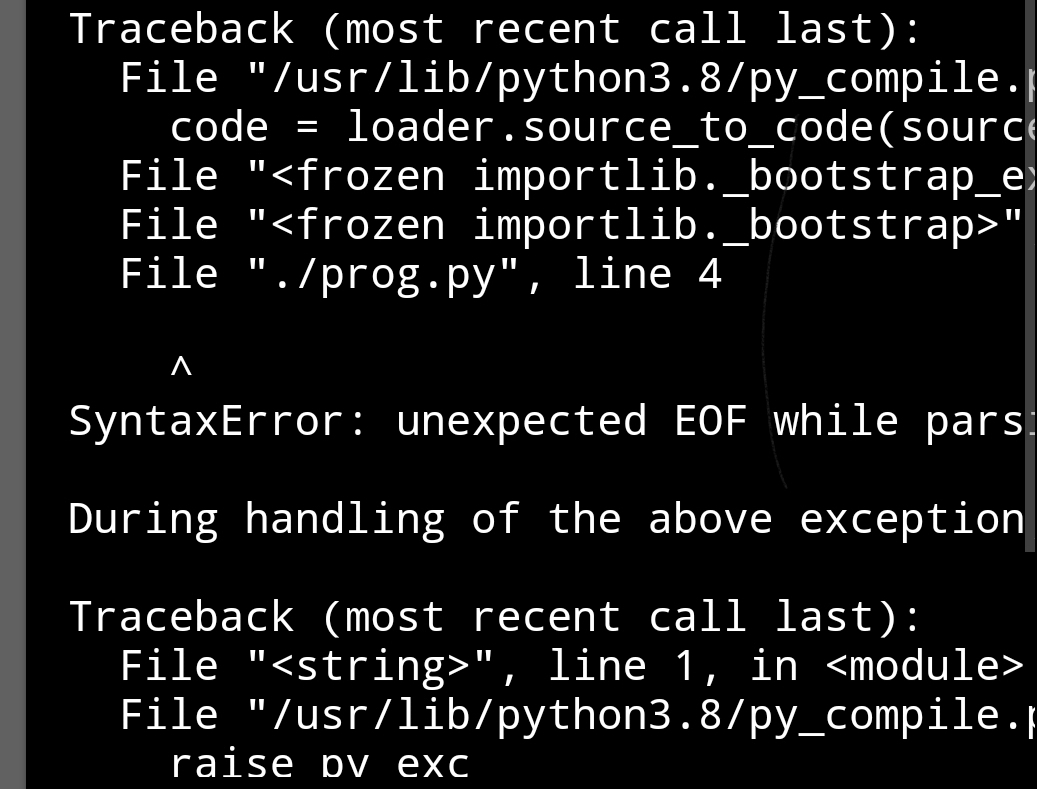
In the above example without a pass statement, it has given a syntax error.

You can use a pass statement in to prevent errors.

For example,
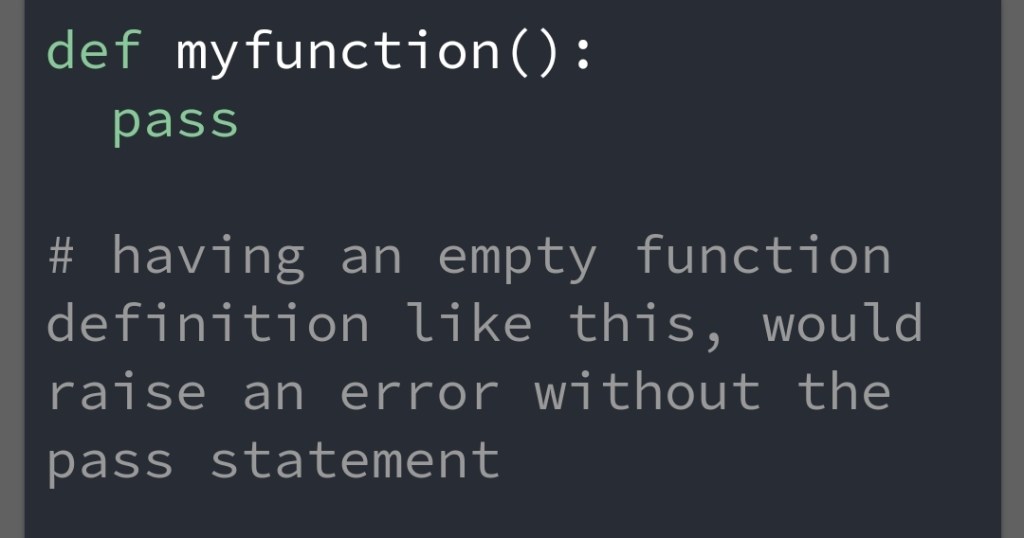
Output

In the above example, you can see that when I have used the pass statement no error has came.


Conclusion

You can repeat the task in python using function.

Function taking arguments to return value. These values are returns using the return statement.

You can use arbitrary arguments to return as many as the value you want.

Using keyword argument you don’t need to care about the order of function argument.

So, what do you think about the python function? Is there anything I have not covered? And you want to cover, comment on it!

I hope you feel it!


For more: visit

Why python slicing is
important?
Create a list with
short syntax!
Core values of python!


"Quality brings clarity "
Why python slicing is important?

You had known about Indexing. In this blog, you are going to see the slicing in python.

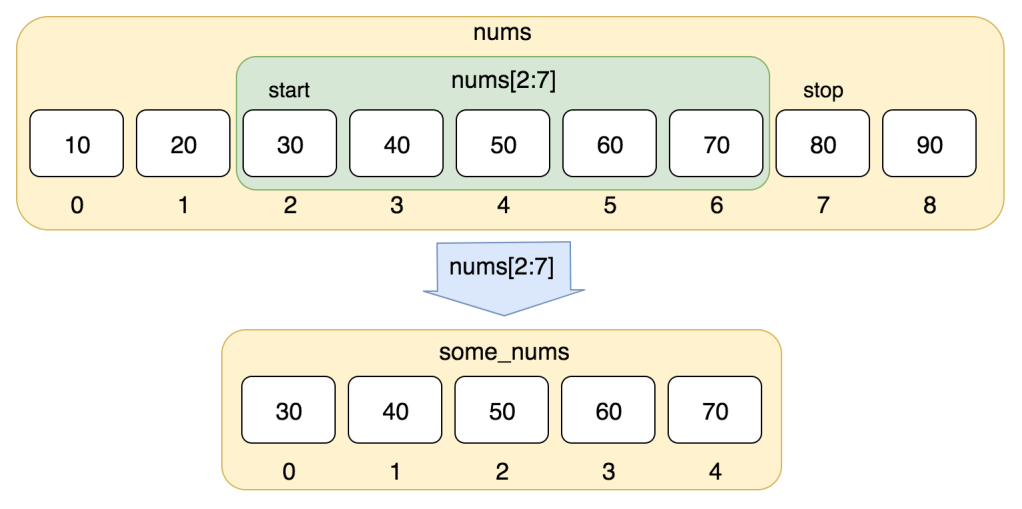
The slicing in the python is the portion extract from the iterable. Iterable are string,list, tuple, set and dictionary of sequence.

These sequences use a square bracket([]) for slicing.

The syntax for slicing is iterable[start:end].

The start is the position where slicing start.

The end is the position where the slicing finish.

Image credit: Railsware

Remember, slicing is not possible in the dictionary and set because of unordered and immutable behaviour.


The start of slicing

The start of slicing is the position where the sequence starts.

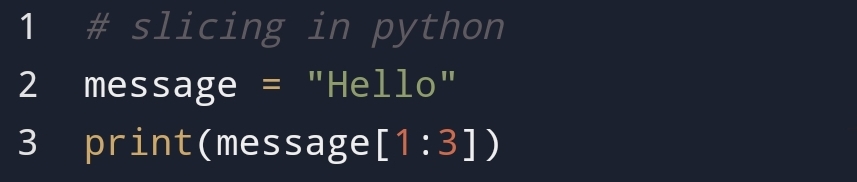
You can give any number to start position. For example,

Output:

In the above example, you can see that I have used string iterable for slicing.

You can use any iterable for slicing.

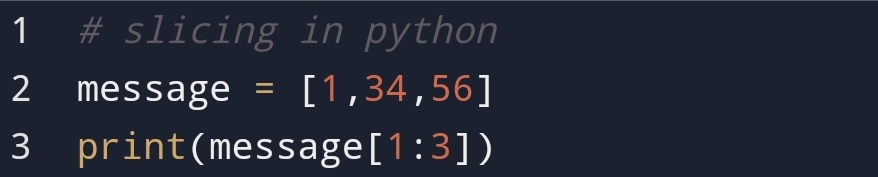
For example,

Output:

In this example, you can see that I have used slicing in the python list.

Remember, The first element position in the sequence is always 0.

For example, in this case, the first element 1’s position is 0.


The end of slicing

At the end of the slicing, the sequence is finished. It’s the last position of the sequence.

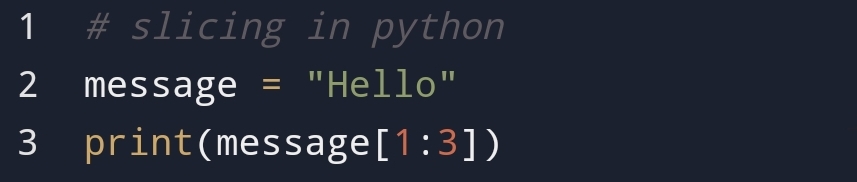
For example,

Output:

In the above example, you can see that the end position is 3.

If you carefully observe then you will found that the last element is last-1. In this case, it’s ‘l’ in 2nd position.

Remember, The last position in slicing always will be last-1 because of the Mathematical formula.


Starting position not included

Suppose in slicing starting position is not included. Only the last position in slicing is included.

What do you think will happen?

For example,

Output:

The purpose is to show how code is working.

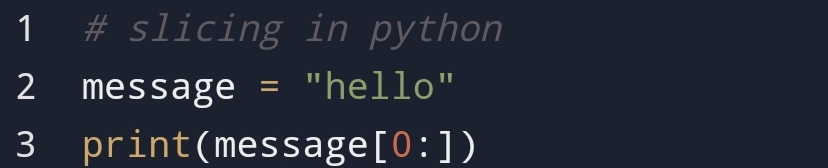
In the above position, you can see that starting position is not included.

So, the sequence has started from the 0th position.

Here, you can see that the 0th position element is ‘h’ till the given 3rd position.

Remember, when starting position is not included the sequence start with the 0th position of iterable.


End position not included

When the end position is not included in slicing then what you think will happen?

It will look like [start: ].

For example,

Output:

In the above example, you can see that the last position is not included only the first position is included.

You can see that the sequence from starting position till the end has come.

Remember, when the last position is not included then from the start position till the last position sequence will come.


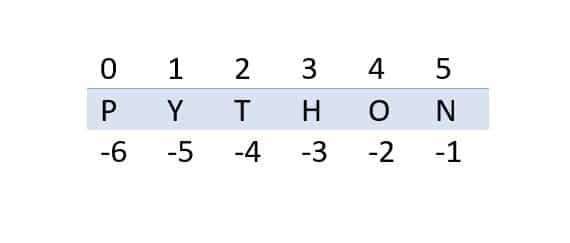
Negative indexing

Image credit: python-tricks

You can slice the python sequences using Negative indexing.

The Negative indexing starts from the last of the sequences.

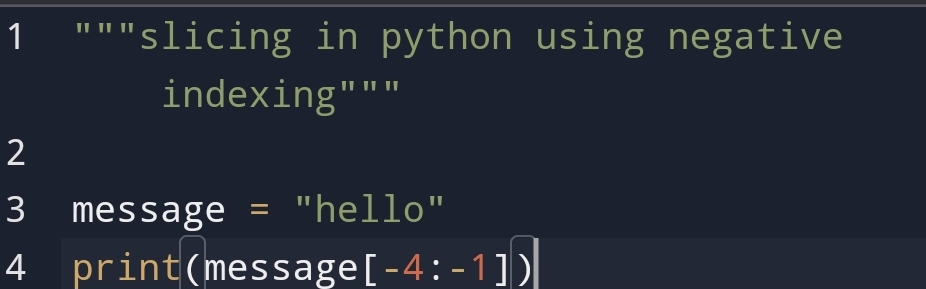
For example,

Output:

In the above example, you can see that sequence starting from -4 I.e. 2nd element and ending at the last element.

In this case, The last element ‘l’ is -1 in negative indexing.


Copy the list using a slice

Suppose, you have to copy the list using a slice. The new copied list should not affect the old one. What do you think you can do?

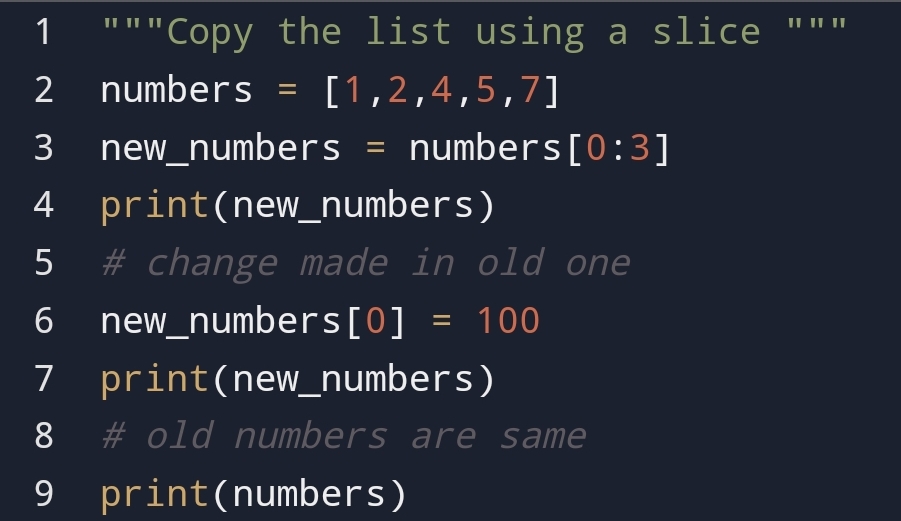
For example, you have to create a new list of a number using the old one.

Output:

In the above example, you can see that I have created a new list of new_numbers using slicing.

Also, you can see that when I have made changes in the list new_numbers, it doesn’t impact the old one.


Conclusion:

Python slicing is important to get some parts of iterable. the iterables are string, tuple and list.

Remember, slicing is not possible in the dictionary and set.

You can also slice using negative indexing. Slicing is a very powerful tool to create a new list.

You can also create a new list using a slice in copy. If you make any changes to the new list, the old one will not be impacted.

Have you found it useful? What do you think? What points I have missed, You think you can cover?


For more, you can visit

List-Comprehension
Python-object
Python-Inheritance
Python-class
Python-lambda

"Quality brings clarity"

Create a List with the short syntax: List comprehension

Python list

In the previous blogs, I have discussed python lists, how to create lists! Why to use a list? You had also seen how to use a for loop?

You know there are many ways to create a list in python. You can create a list with the help of the for loop, map and list constructor.

These methods are useful to create a python list. Although these methods only applicable to particular condition.

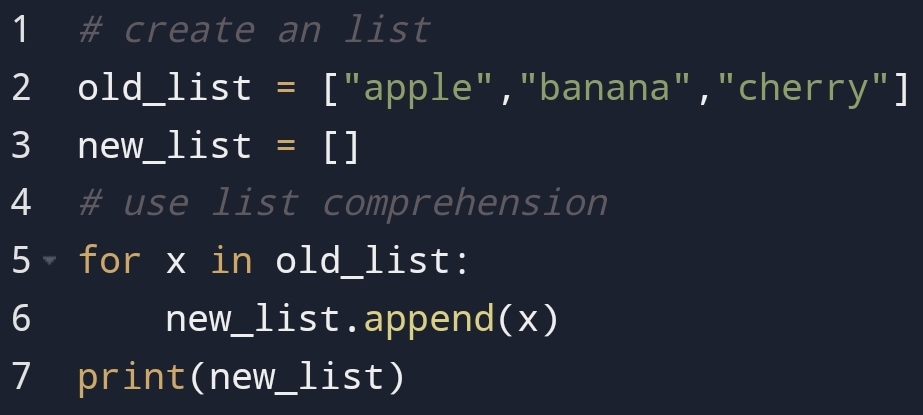
For example,

Output:

In the above example, you can see that it’s easy to write the code. But it irritates the same process again and again.

To solve this problem python community introduced List comprehension in python 2.0.

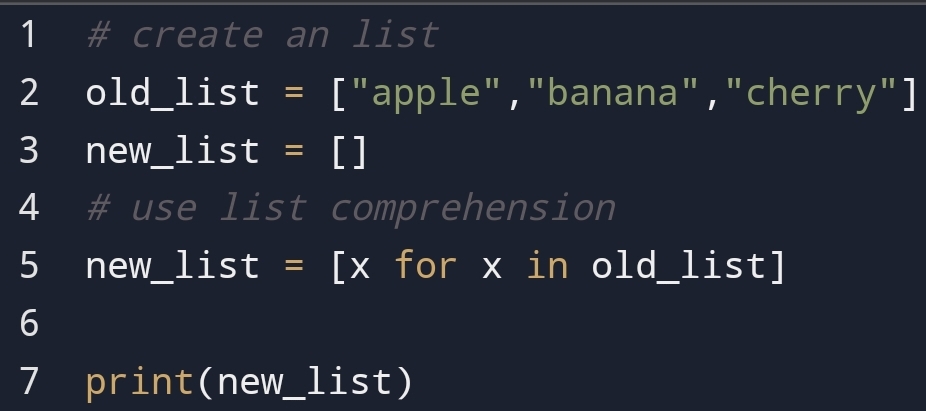
So, With the help of the list comprehension, you can do this task in one line of code.

For example,

Output:

In the above example, you can see that How easily I had done instead of using for loop.

So, what the meaning of comprehension?


Comprehension is used here to means complete inclusion.


In this blog, you are going to see why we use List comprehension? What is the meaning of the list comprehension? And how to use List comprehension?


What is list comprehension?

The term list comprehension comes when you have to create a new list based on the old list.

With the help of the list comprehension, you can do expression, iterable(dict, set, list) in one line of code.

You don’t need to use the for loop.

The syntax of the list comprehension is 

new_list = [expression for item in iterable if condition == True]

The return value of list comprehension is a new list leaving the old list unchanged.


Condition accept the item first if it is true. A condition statement is optional. You can remove it.


The iterable is list, dictionary, set and tuple. This iterable is an old list in which working you have to create a new one.


The expression in the list comprehension returns the current items with functionality. You can apply the method to expression.

You can manipulate the expression before it ends.


Expression with condition

In this section, you are going to see how to put the condition with expression.

So, why I’m putting a condition in expression.

I’m putting a condition in the expression because I have to apply expression in a particular condition.

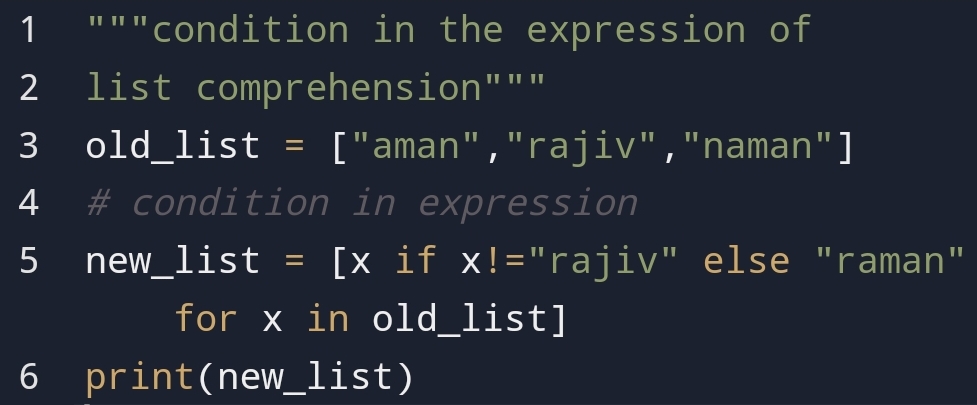
For example,

Output:

Here, you can see that how I had applied the condition in the expression.

You can apply the if-else in expression.

In the above example, you can see that I have defined the list and its functionality at the same time.


There are many benefits of the list that you can use in a list comprehension.


Benefits of list comprehension

List comprehension is a single tool that you can use in many situations.

For example, you can use it in mapping and filtering.

In it, you don’t have to remember the order of the argument.

It’s a declarative statement that means easy to read and use.

The benefit of list comprehension is that you have only to focus on what you want. For output, you can trust python.

In the case of speed, list comprehension is faster than for loop.


Disadvantage

The main disadvantage of list comprehension is that programmers use it when code is easy.

But you have to use list comprehension when the code is harder to understand.

One of the reasons you are using the list comprehension to make a clean and shortcode.

If the logic is too long then you shouldn’t use list comprehension.

In list comprehension, you can only gain a list. Not other iterable such as tuple, list and dictionary.


Conclusion:

If you want clear and shortcode you can use the list comprehension.

With the help of list comprehension, you can execute code much faster than the solution using the map and lambda.

Although, there are many disadvantages of list comprehension. Mostly when the logic is too long you shouldn’t use list comprehension.

You can use list comprehension in many different situations.

You can’t use tuple comprehension because the tuple is not using in for loop.


Thanks for reaching this point. I hope you loved it. If you found it interesting then share it. If you found something misinform you can tell me.


For more, you can see

python-object
python-inheritance
python-class
python-intro
python-lambda

"Quality brings clarity"