1) Admin site
Admin site used by site administrators not general user In this section we’ll add some topics through Topic model. We’ll use admin.site .
1) Setting Up a Superuser
Django allows you to create a user who has all privileges available on the site, called a superuser. A privilege controls the actions a user can take. We’ll use following command to create a superuser.
>>>python manage.py createsuperuser
It will show :
➊ Username (leave blank to use ‘ehmatthes’): ll_admin
➋ Email address:
➌ Password:
Password (again):
Superuser created successfully.
(ll_env)learning_log$
At ➊ we’ll give username, you can give any username .
At ➋ we can give email or leave it blank.
At ➌ we have give password twicely .
2) Registering a Model with the Admin Site
Django includes some models in the admin site automatically, such as User and Group, but the models we create need to be registered manually.
When we started the learning_logs app, Django created a file called admin.py in the same directory as models.py:
admin.py
from django.contrib import admin
Register your models here.
To register Topic with the admin site, enter:
from django.contrib import admin
➊ from learning_logs.models import Topic
➋ admin.site.register(Topic)
This code imports the model we want to register, Topic ➊, and then uses admin.site.register() ➋ to tell Django to manage our model through the admin site.
Go htttp://localhost:8000/admin/, enter the username and password for the superuser you just created.
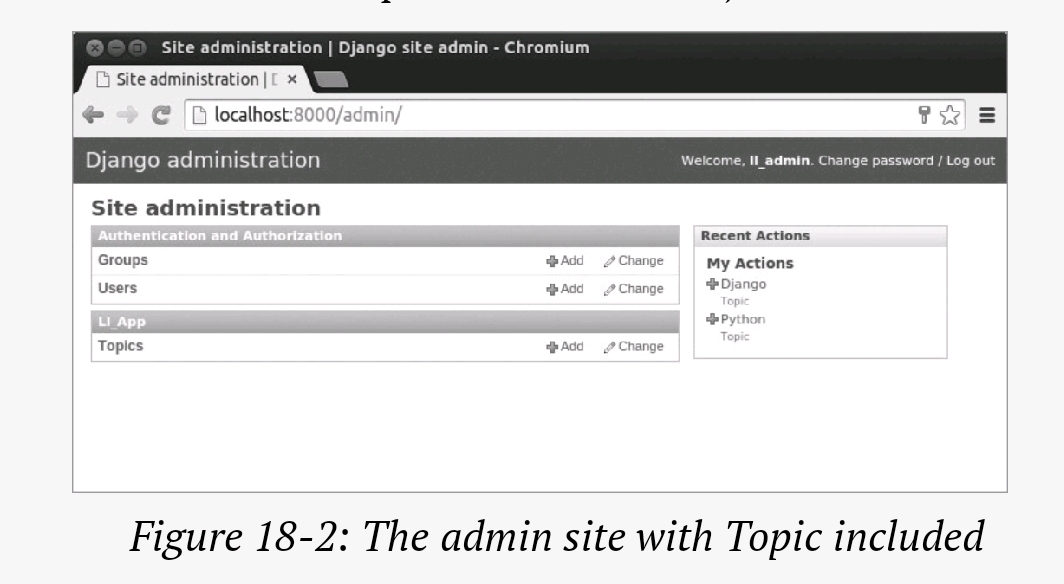
We’ll see adding topics,Creating database for topics in next chapter .
If you want to see more blogs related to python or facts about programming you can check https://vipulkunwar503.code.blog
Best Regards,
 Mr.Python